What's New

Stay up to date with the latest features and improvements

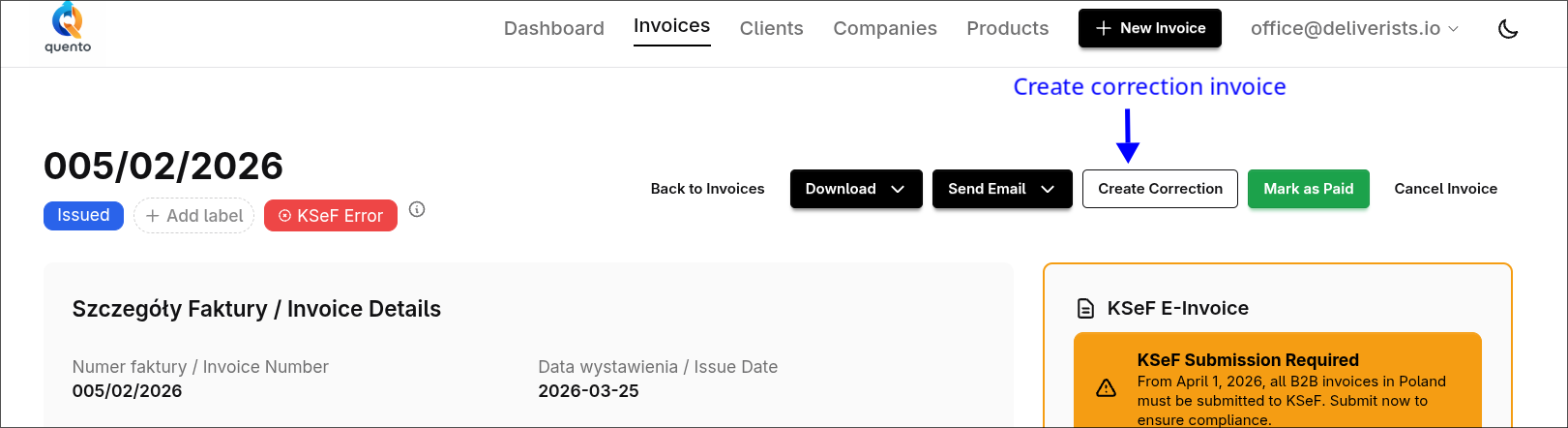
Quento Now Supports KSeF - Poland's National e-Invoice System

Submit invoices directly to Poland's KSeF system with one click.

New
Read More

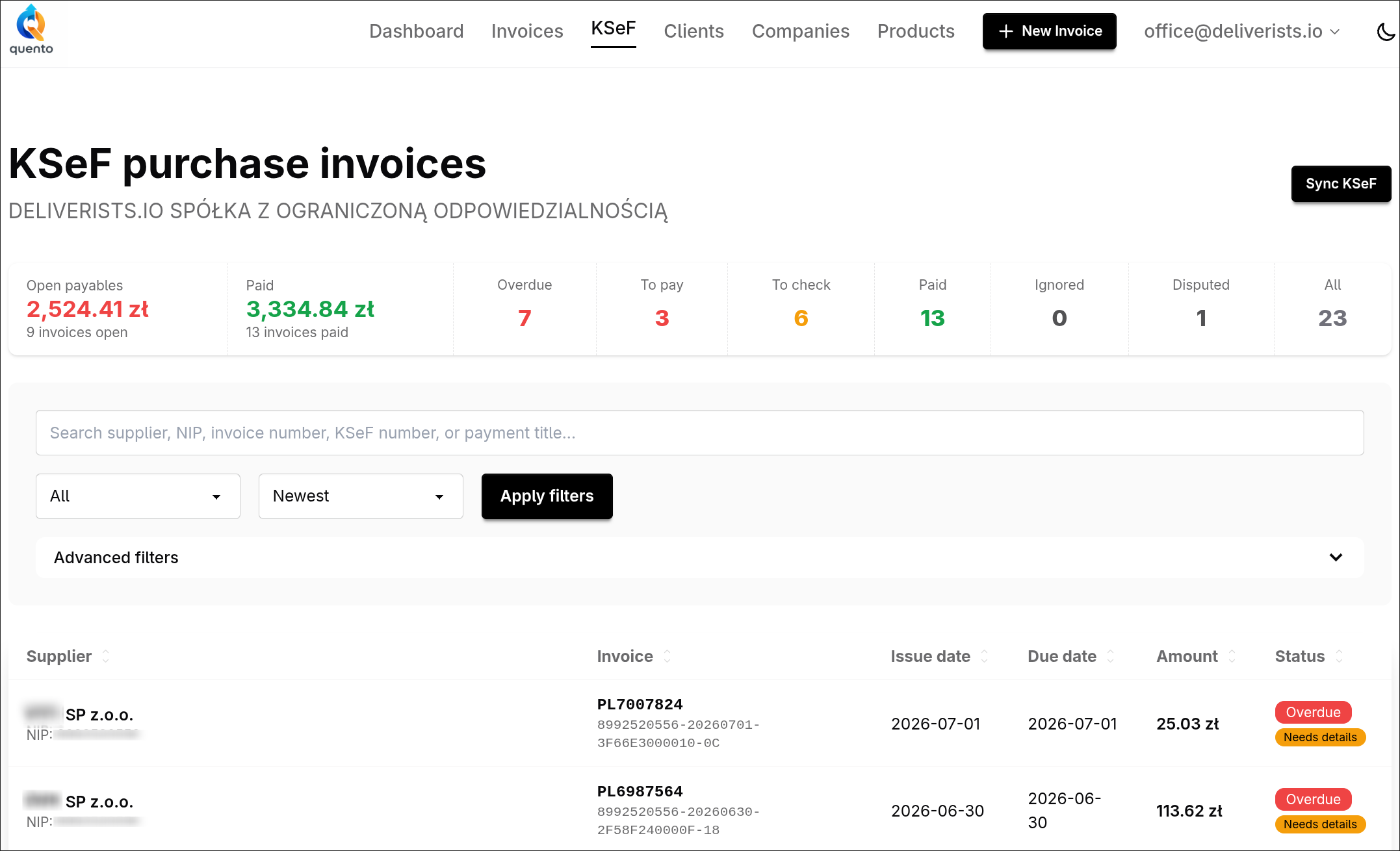
Great news for Polish businesses - Quento supports KSeF 2.0 (Krajowy System e-Faktur) with demo testing and full production support now available.

What is KSeF?

KSeF is Poland's mandatory electronic invoicing system for B2B transactions. If you have a Polish NIP and issue B2B invoices, you need KSeF compliance.

Mandatory from 2026:

  • February 1, 2026: Companies with 200M+ PLN revenue (2024)
  • April 1, 2026: All businesses
  • January 1, 2027: Small businesses (under 10K PLN monthly sales)

Learn more about KSeF โ†’

How It Works

  1. Create your invoice in Quento
  2. Click "Submit to KSeF"
  3. Get instant confirmation with KSeF reference number

That's it.

Video Tutorial (po polsku)

Watch this 3-minute guide to see how easy it is:

Obejrzyj na YouTube โ†’

Setup

  1. Go to Company Settings โ†’ edit your Polish company
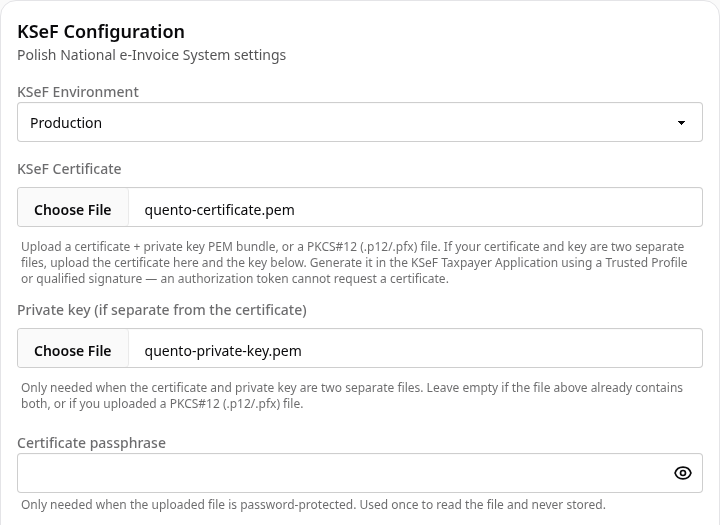
  2. Scroll to KSeF Configuration
  3. Select environment:
    • Demo (available now - real authentication with test invoices)
    • Production (real invoices - available now)
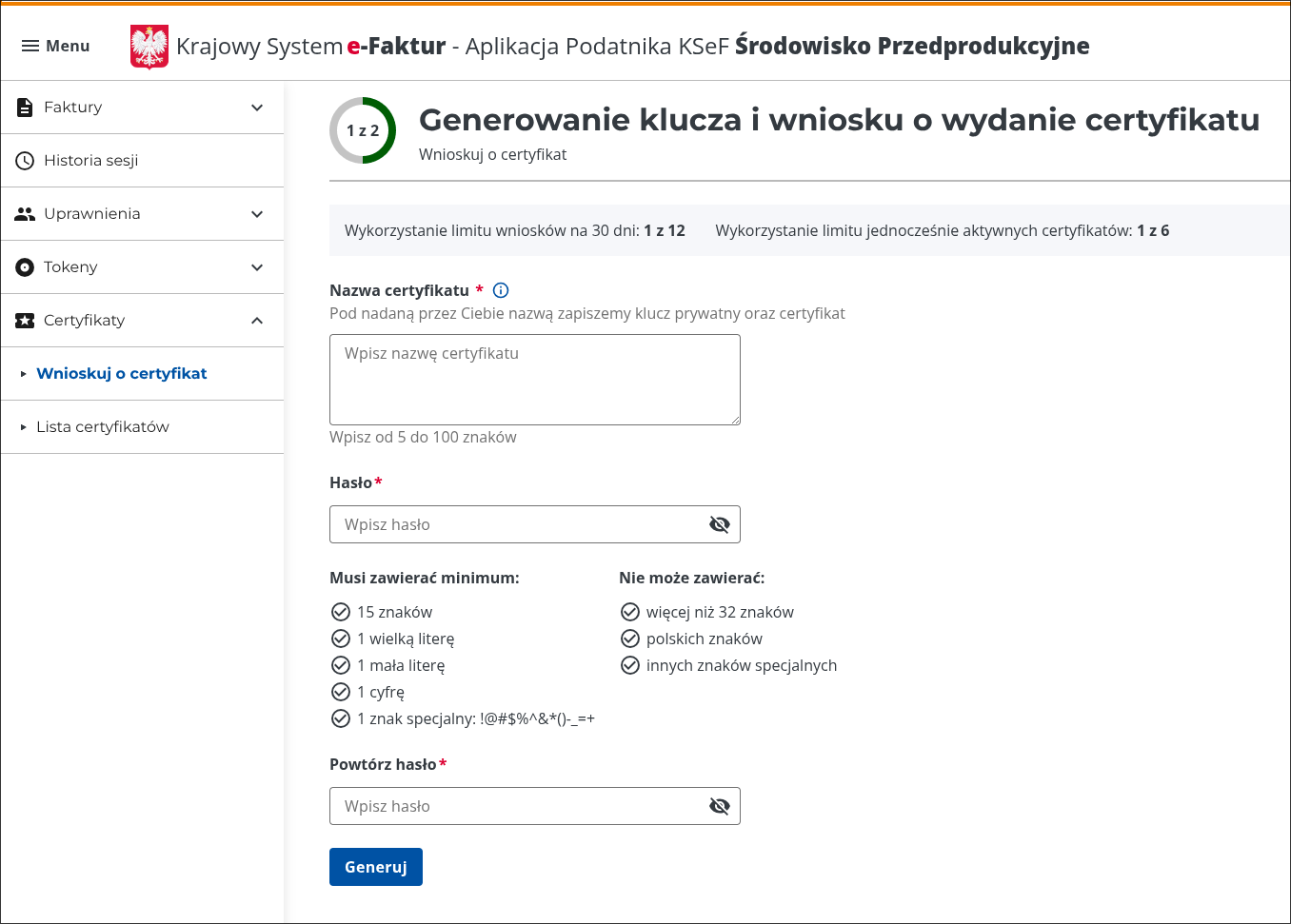
  4. Get your authentication token:
  5. Paste the token in Quento and click Save

Start testing today with the Demo environment - it uses real KSeF authentication with test invoices. Production environment is now available for real invoice submissions.

Features

Real-time Status - Watch your invoice go from "Processing in KSeF" to "KSeF" (accepted)

KSeF Reference Number - Get unique government reference number on accepted invoices

Multi-Company - Each company gets its own KSeF configuration

Demo Environment - Available now for testing with real authentication and test invoices

Pricing

KSeF support is included free in all Quento plans - no additional cost, no per-invoice fees, no limits.

Get Started

  1. Sign up at www.quento.app
  2. Add your Polish company with NIP number
  3. Get your authentication token from KSeF portal (see Setup section above)
  4. Enter the token in your Quento company settings

Questions?

"Can I test first?"
Yes - use demo environment with real authentication but test invoices.

"Multiple companies?"
Each company gets its own KSeF settings.

"Need help?"
Email support@quento.app

Start Using KSeF Today โ†’

โ€” The Quento Team

New: Copy Invoices to Save Time on Similar Bills

Quickly duplicate existing invoices with all items, labels, and settings preserved. Perfect for recurring clients and similar jobs.

New
Read More

Creating similar invoices just got a whole lot faster. Introducing Invoice Copy - a simple way to duplicate any existing invoice and use it as a starting point for a new one.

Why You'll Love This

Stop re-entering the same information. If you invoice the same client regularly or create similar invoices for different customers, copying saves you minutes on every bill.

What gets copied:

  • All line items with descriptions, quantities, and prices
  • Company and client details
  • Payment terms and method
  • Currency and language settings
  • Labels you've assigned

What gets reset:

  • Invoice number (auto-generated fresh)
  • Dates (set to today)
  • Status (starts as draft)

How to Copy an Invoice

Step 1: Find Your Invoice

Go to your Invoices page and find the invoice you want to copy.

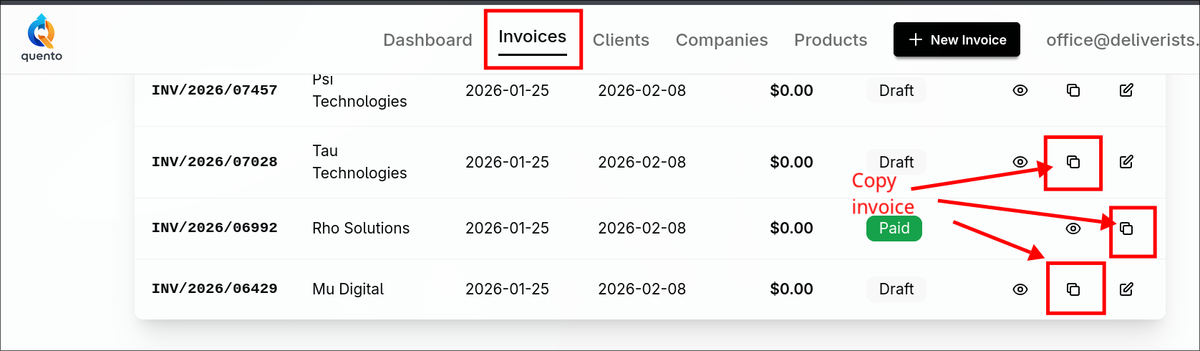
Step 2: Click the Copy Button

Look for the copy icon (two overlapping squares) in the actions column on the right side of the invoice row.

Copy button in invoice list

Note: The copy button appears for draft, issued, and paid invoices. Cancelled or overdue invoices can't be copied.

Step 3: Edit and Save

You'll land on the New Invoice page with everything pre-filled:

  • All line items from the original invoice
  • Same client and company selected
  • Matching payment terms and currency
  • Your labels preserved

Make your changes - adjust quantities, update prices, add or remove items - then save as draft or issue immediately.

Perfect For

Recurring Clients

Invoice the same customer weekly or monthly? Copy last month's invoice, update the dates, and send. Done in seconds.

Similar Jobs

Do you offer the same services to different clients? Create one "template" invoice with your standard services, then copy and customize for each customer.

Retainers and Packages

Have set service packages? Build them once, copy as needed, adjust only what's different.

Error Corrections

Need to re-issue a similar invoice with corrections? Copy the original, fix what needs changing, and send the new version.

What Stays and What Changes

Copied to the New Invoice

Field What Gets Copied
All line items Products, quantities, unit prices, VAT rates, positions
Client & company All billing details, addresses, tax numbers
Payment terms Number of days for due date calculation
Currency PLN, EUR, USD, or other selected currency
Payment method Transfer, cash, card, or other method
Labels All tags and categories assigned to invoice
Notes Public notes for client and internal notes

Reset for the New Invoice

Field What Happens
Invoice number Auto-generated when you issue the invoice
Issue date Left blank โ€” set automatically when issued
Sale date Reset to today's date
Due date Calculated from payment terms after issue
Status Always starts as draft (ready to edit)
Paid date Left blank โ€” no payment recorded
KSeF reference Blank โ€” for Polish e-invoicing system

Tips for Best Results

Create "Template" Invoices

Set up draft invoices for your most common service combinations. Don't issue them - just keep them as templates to copy whenever needed.

Copy from Your Best Examples

Have a particularly well-structured invoice? Use it as your base for future bills to maintain consistency.

Combine with Labels

Add labels like "monthly-template" or "package-a" to invoices you copy often. They'll be preserved when copying, helping you stay organized.

FAQ

"Can I copy any invoice?"

You can copy draft, issued, and paid invoices. Cancelled and overdue invoices cannot be copied.

"Does copying affect the original invoice?"

No - the original stays exactly as it was. You're creating a brand new invoice that starts as a duplicate.

"Can I copy an invoice from a different client to use for another?"

Yes! The copy keeps the original client selected, but you can easily change it before saving.

"Do copied invoices keep their history or payments?"

No - the new invoice starts fresh with no payment history, email records, or KSeF submissions.

"Is there a limit to how many times I can copy an invoice?"

Copy as many times as you need. Each copy is a completely independent new invoice.

Ready to Save Time?

Next time you need to create a similar invoice, skip the manual entry. Just hit that copy button and start from a solid foundation.

Try It Now โ†’

Head to your invoices page and look for the copy icon on any draft, issued, or paid invoice.

Have questions or feedback about this feature? Email us at support@quento.app - we read every message.

โ€” The Quento Team

Quento Now Supports XRechnung - Germany's E-Invoicing Standard

Create legally compliant German e-invoices with ChatGPT. XRechnung 3.0 support now available with automatic generation, validation, and ELSTER approval.

New
Read More

Big news for businesses invoicing in Germany - Quento now supports XRechnung, Germany's mandatory e-invoicing standard.

What is XRechnung?

XRechnung is Germany's national standard for electronic invoicing, based on the European EN 16931 standard. It's:

  • Mandatory for German public sector since 2020
  • Coming for B2B transactions between 2025-2028
  • Structured XML format (UBL 2.1) for automatic processing
  • Legally compliant when validated by official authorities

If you invoice German government entities or B2B customers, you'll need XRechnung-compliant invoices.

How It Works

Automatic Detection: Quento automatically generates XRechnung XML when:

  • Your company is located in Germany (DE),
  • Your client/customer is located in Germany (DE)

If either condition is met, the XRechnung option appears automatically - no configuration needed.

Simple Process:

  1. Create your invoice (web interface or ChatGPT)
  2. XRechnung auto-generates - proper XML structure, VAT IDs, tax codes
  3. Download or email - get the XML file directly or attach to emails

Multiple Ways to Get Your XRechnung

Download Directly:

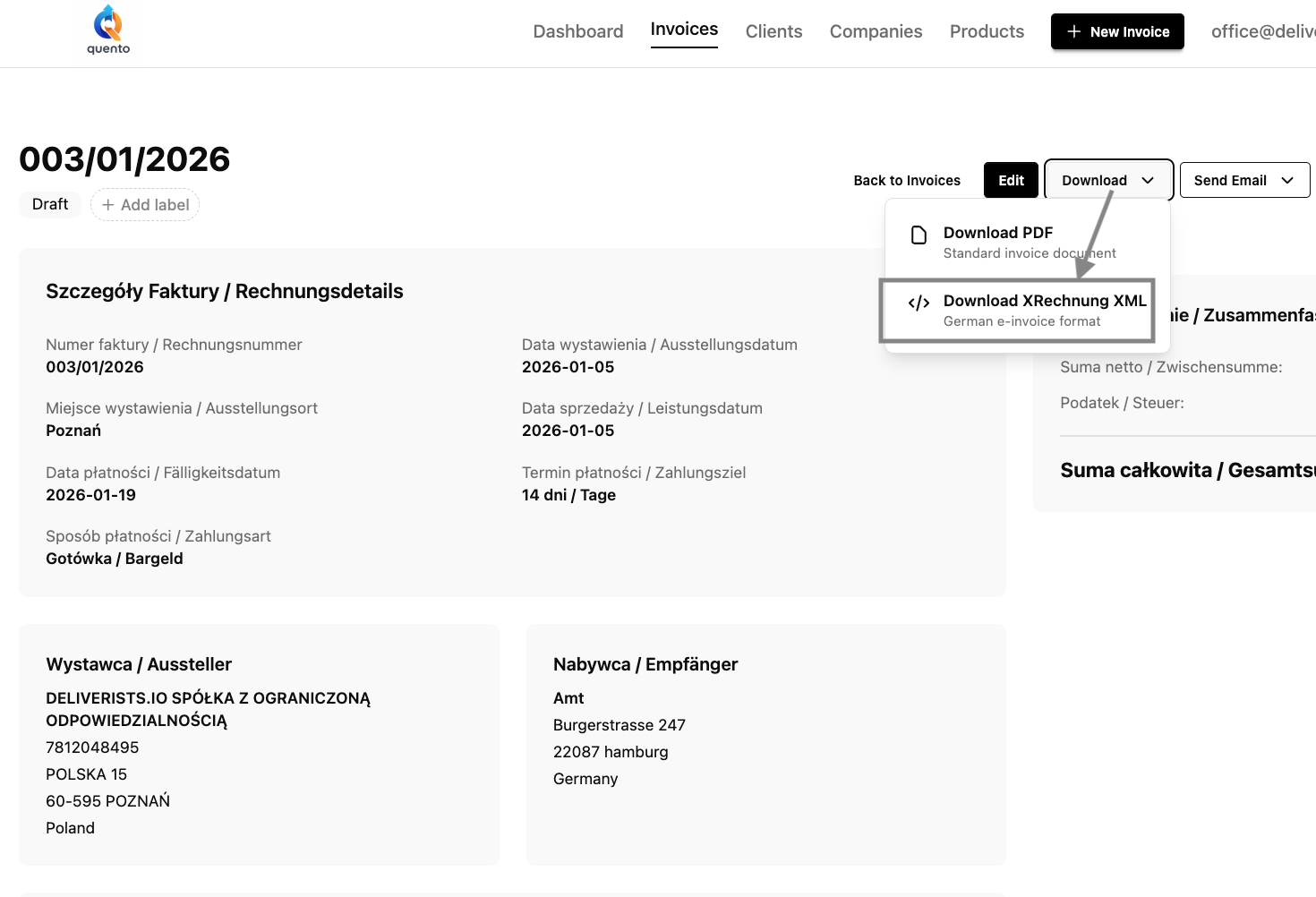
  • Click the "Download" dropdown on any invoice with a German client
  • Choose "Download XRechnung XML" to get the XML file instantly
  • Also available: standard PDF download from the same menu
Download XRechnung XML from invoice page

Send via Email:

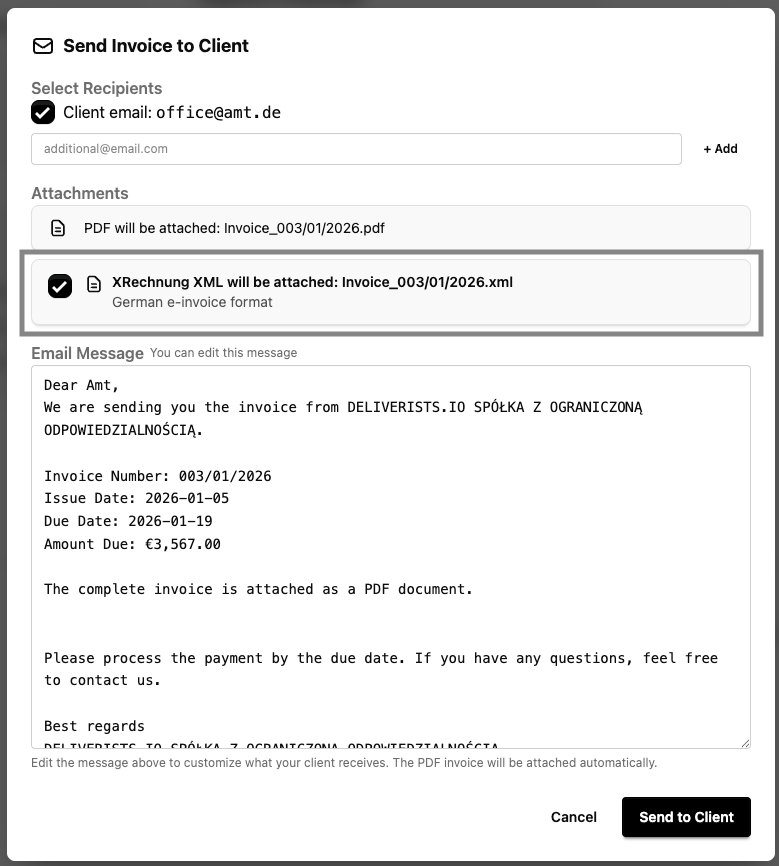
  • Use "Send Email" dropdown
  • Check "Include XRechnung XML" (auto-checked for German clients)
  • XML file attaches automatically alongside the PDF
Send invoice with XRechnung XML attachment

Both options validate your client data first - no surprises, no errors.

Validated by ELSTER

Our XRechnung implementation has been tested and validated by ELSTER - the official German tax authority validator. This is the gold standard for compliance.

Who Needs XRechnung?

German Public Sector Suppliers

If you invoice any German government entity (federal, state, local), XRechnung has been mandatory since 2020:

  • Federal agencies (Bundesbehรถrden)
  • State governments (Landesbehรถrden)
  • Municipalities (Kommunen)
  • Public universities and research institutions

B2B Businesses (Coming Soon)

Germany is rolling out mandatory B2B e-invoicing:

  • 2025: Businesses must accept e-invoices
  • 2027: Businesses must send e-invoices (โ‚ฌ800K+ revenue)
  • 2028: All B2B transactions require e-invoices

Get ahead of the curve now.

Cross-Border EU Businesses

PEPPOL network compatibility means your XRechnungs work internationally:

  • Interoperable with thousands of European businesses
  • Automatic routing through PEPPOL network
  • Ready for pan-European e-invoicing

Technical Specifications

For the technically curious:

Compliance Standards:

  • XRechnung 3.0.1 (urn:xeinkauf.de:kosit:xrechnung_3.0)
  • EN 16931 (European e-invoicing standard)
  • UBL 2.1 (OASIS Universal Business Language)
  • PEPPOL BIS Billing 3.0

Features:

  • Multi-currency (EUR, PLN, USD, GBP, and more)
  • Multiple VAT rates and reverse charge support
  • Automatic XML generation and email attachment
  • Direct XML download from invoice page
  • Real-time validation with detailed error messages
  • Account-level feature flag control

Pricing

XRechnung generation is included in all Quento plans at no additional cost:

  • Free tier: XRechnung included
  • All paid plans: XRechnung included
  • No per-invoice fees
  • No hidden charges

Simple, transparent pricing.

Get Started Today

Ready to simplify German invoicing? Here's how to start:

  1. Sign up at www.quento.app (free tier available)
  2. Create your first compliant invoice in minutes

Or try with ChatGPT:

  1. Connect ChatGPT to your Quento account via OAuth
  2. Say: "Create an invoice for [German client], [amount], [description]"
  3. Get compliant XRechnung automatically

Questions?

"Is XRechnung mandatory for my business?"

  • Yes if you invoice German public sector entities
  • Coming soon for B2B transactions (2025-2028 rollout)
  • Recommended for German enterprise customers (many prefer it)

"Can I use XRechnung with ChatGPT?"

Yes! Connect your Quento account to ChatGPT and create compliant invoices using natural language. Unique to Quento.

"How do I get the XRechnung XML file?"

Two ways:

  • Download: Click "Download" dropdown on any invoice โ†’ select "XRechnung XML"
  • Email: Check "Include XRechnung XML" when sending invoice emails (auto-checked for German clients)

Both methods validate client data before generating the file.

Ready to Comply?

Germany's e-invoicing mandate is here. Quento makes compliance simple, automatic, and integrated with your workflow.

Start Using XRechnung Today โ†’

Questions or feedback? Email us at support@quento.app - we're here to help!

โ€” The Quento Team

Quento is Now a Mobile App!

Install Quento on your phone like a native app. No app store needed - just open, click, and add to home screen for instant invoicing on the go.

Read More

Big news - Quento now works as a mobile app! No need to visit the app store, download anything, or wait for updates. Just add Quento to your phone's home screen and use it like any other app.

What's a Web App?

A Progressive Web App (PWA) gives you the best of both worlds: the convenience of a native app with the flexibility of a website. Once installed:

  • Lives on your home screen alongside your other apps
  • Opens instantly in full-screen mode (no browser bars!)
  • Works offline for seamless invoicing anywhere
  • Updates automatically - no manual app store downloads
  • Uses less storage than traditional apps

Think of it as having Quento in your pocket, ready whenever you need it.

How to Install (Takes 30 Seconds)

On iPhone (Safari)

  1. Open Safari and go to www.quento.app
  2. Tap the Share button (square with arrow pointing up)
  3. Scroll down and tap "Add to Home Screen"
  4. Tap "Add" - done!

On Android (Chrome)

  1. Open Chrome and go to www.quento.app
  2. Tap the three-dot menu (โ‹ฎ) in the corner
  3. Tap "Add to Home Screen" or "Install App"
  4. Tap "Add" - you're set!

On Android (Firefox)

  1. Open Firefox and go to www.quento.app
  2. Tap the three-dot menu (โ‹ฎ)
  3. Tap "Install"
  4. Confirm - finished!

That's it! Look for the Quento icon on your home screen.

Watch the Video Tutorial

See the exact steps in action:

Watch on YouTube โ†’

Why Use Quento as an App?

Faster Access

No more typing URLs or searching bookmarks. Just tap the icon and start invoicing.

Full-Screen Experience

Works in full-screen mode - no browser bars means more space for your invoices and data.

Feels Native

Smooth animations, gestures, and navigation that feel just like a native app.

Always Current

New features and improvements roll out automatically. No "update available" notifications or app store approvals.

Lightweight

Uses minimal device storage compared to traditional apps - perfect if you're low on space.

Perfect for On-the-Go Invoicing

Whether you're at a client meeting, traveling, or just away from your desk, Quento is now always at your fingertips:

  • Create invoices while meeting with clients
  • Check payment status on your commute
  • Send quick reminders between appointments
  • Review your dashboard anywhere, anytime

Troubleshooting

Can't find "Add to Home Screen"?

  • Make sure you're logged in to (not your subdomain like yourcompany.quento.app)
  • Use Safari on iPhone or Chrome on Android for best results
  • Update your browser to the latest version

Icon not showing up?

  • Restart your phone and check again
  • Try uninstalling and reinstalling from the browser

Need help?
Email us at support@quento.app - we're here to help!

Try It Today

Transform your invoicing workflow by putting Quento right on your home screen. It takes 30 seconds to install and gives you instant access to all your invoicing needs.

Install Quento Now โ†’

Have questions or feedback about the mobile experience? We'd love to hear from you - just tap the feedback button in your dashboard or email us directly.

โ€” The Quento Team

New Feature: Keep Your Accountant in the Loop

Never forget to send invoice copies to your accountant again. Set up your accounting email once, and send clean bookkeeping copies with a single click.

Read More

We've all been there - you send an invoice to a client, and then realize hours (or days!) later that you forgot to send a copy to your accountant.

No more! Starting today, Quento makes it easy to keep your accountant in the loop with dedicated bookkeeping copies.

Watch the Tutorial

See this feature in action! Watch our step-by-step video guide:

Watch on YouTube โ†’

What's New

You can now add an accounting email address to your company profile. When you've sent an invoice to your client, use the new "Send Copy to Accountants" button to deliver a standardized bookkeeping copy - completely separate from your client email.

Important: This is NOT automatic. You have full control - send copies only when YOU decide your accountant needs them.

Why This Matters

Two Separate Actions

Sending to your client (with payment instructions and custom messages) and sending to your accountant (clean bookkeeping copy) are now completely separate actions. No more "Reply All" disasters!

Standardized Format

Your accountant gets a clean, professional copy marked "For Your Records" - no payment buttons, no custom client messages, just the facts they need.

Never Forget Again

Once you save your accounting email in company settings, it's pre-selected every time. One click, and your accountant has the invoice.

Perfect for Teams

Add multiple recipients on the fly - your tax advisor, CFO, bookkeeper, or business partner can all receive copies when needed.

How It Works

One-Time Setup (30 seconds)

  1. Go to Company Settings
  2. Find the "Accounting Email" field
  3. Enter your accountant's email address
  4. Click Save

That's it! Your accounting email is now saved for future use.

Sending Copies to Your Accountant

After sending an invoice to your client, you'll see a new button: "Send Copy to Accountants"

Click it and you'll see:
- Your saved accounting email pre-checked (ready to go!)
- Option to add additional recipients (tax advisor, CFO, etc.)
- One-click send - no editing, no customization needed

The standardized email format keeps it clean and professional for bookkeeping purposes.

What Your Accountant Receives

Your accountant gets a simple, professional email:

Subject: Invoice #123/01/2026 - For Your Records

This is a copy of the invoice sent to ABC Company Ltd for your bookkeeping records.

Attachment: Invoice12301_2026.pdf

No payment buttons. No client-facing messages. Just the invoice they need for your books.

Perfect for Tax Season

Build a complete paper trail throughout the year. Your accountant has every invoice as you send them - no scrambling to export reports or forward emails when tax time arrives.

Real-World Use Cases

Monthly Bookkeeping

Send copies at month-end so your accountant can close your books without chasing you for invoices.

Quarterly VAT Returns

Forward all VAT-eligible invoices to your tax advisor as you create them.

Year-End Prep

Your accountant already has everything - annual reporting becomes a breeze.

Client Disputes

When a client claims they never received an invoice, your accountant has the proof in their records.

Frequently Asked Questions

Q: Do I have to send copies every time?

A: Absolutely not! This is completely optional. Use it only when your accountant needs a copy. Your normal "Send to Client" workflow is unchanged.

Q: Will my accountant see the email I send to the client?

A: No! The accountant receives a completely separate, standardized email designed for bookkeeping. Your client communication remains private.

Q: Can I send to multiple accountants?

A: Yes! Your saved accounting email is pre-selected, but you can add as many additional recipients as needed using the "Add recipient" button.

Q: Can I customize the message to accountants?

A: No, and that's intentional. The standardized format keeps everything professional and consistent for bookkeeping purposes. Your accountant will appreciate the consistency.

Q: Can I send copies of old invoices?

A: Absolutely! Open any invoice (even ones from last year) and use "Send Copy to Accountants" to forward it to your bookkeeper whenever needed.

Q: What if I don't have an accounting email saved?

A: No problem! You can still use the feature by adding email addresses manually when sending. To save time on future invoices, just add your accountant's email in Company Settings.

Q: Does this cost extra?

A: Nope! This feature is included in all Quento plans at no additional cost.


We built this feature because we heard from dozens of users who kept forgetting to CC their accountants. Now it's impossible to forget - your accounting email is always just one click away.

Have ideas for making this feature even better? We're all ears! Hit the feedback button in your dashboard or email us at support@quento.app.

Happy invoicing!

โ€” The Quento Team

Happy New Year 2026 from Quento!

Wishing you a prosperous year ahead filled with growth, success, and smooth invoicing. Here's to making 2026 your best year yet!

Read More

As we step into 2026, we want to take a moment to thank you for choosing Quento as your invoicing partner.

Your trust means everything to us. Whether you sent your first invoice with us or your thousandth, you've been part of our journey, and we're honored to be part of yours.

Looking Back at 2025

What a year it's been! 2025 was all about bringing Quento from idea to reality:

  • Built Quento from the ground up - Designed and developed a modern invoicing platform from scratch
  • Launched in December - Released Quento to the world with all core features ready
  • AI-powered invoicing - Integrated ChatGPT to let you create invoices using natural language
  • 160+ currencies - Built support for businesses operating globally
  • Multi-language support - English, Polish, and German from day one

We started the year with a vision and ended it with a product we're truly proud of. Thank you to our early adopters who joined us on this journey!

What's Coming in 2026

We're not slowing down. This year, we're focused on making Quento even better:

  • Polish KSeF integration - Automatic submission to Poland's National e-Invoice System
  • Enhanced automation - Less manual work, more time for what matters
  • Deeper insights - Better analytics to help you understand your business
  • Faster workflows - We're always looking for ways to save you time
  • More integrations - Connect Quento with the tools you already love

Stay tuned for exciting announcements throughout the year!

Our Wish for You

As you plan your business goals for 2026, we hope this is your year of:

  • Growth - May your client list expand and your revenue soar
  • Efficiency - Spend less time on paperwork, more time doing what you love
  • Peace of mind - Know that your invoicing is handled, professionally and reliably
  • Success - However you define it, may this be your most successful year yet

Let's Make 2026 Amazing

We're committed to being more than just software - we're your partner in building a thriving business. Have ideas for features? Feedback on what we're doing? Just want to share a success story?

We're always listening. Drop us a line at support@quento.app or use the feedback button in your dashboard.

Here's to a fantastic 2026 filled with growth, success, and invoices that practically send themselves!

Happy New Year!

โ€” The Quento Team

Welcome to Quento - Your Invoicing Journey Starts Here!

We're thrilled to have you here! You've just taken the first step toward transforming how you handle invoicing.

Read More

Quento was born from a simple belief: invoicing shouldn't be painful, time-consuming, or complicated. We built Quento for freelancers, small businesses, and entrepreneurs who want to spend less time on paperwork and more time doing what they love.

Why Quento is Different

Talk to Your Invoices with AI

Yes, you read that right! Our ChatGPT integration lets you create invoices, manage clients, and track payments using natural language. Just tell Quento what you need:

"Create an invoice for John Smith for web design services, โ‚ฌ1,500"

And it's done. It's like having a personal assistant who never sleeps.

Built for the Modern World

Whether you're in Warsaw, Berlin, or London - Quento speaks your language. Full support for English, Polish, and German means you and your clients always feel at home.

Handle multiple currencies? We support over 160 currencies from around the world - from USD and EUR to exotic currencies like Vietnamese Dong or Moroccan Dirham.

Lightning-Fast Workflow

From creating your first invoice to getting paid, Quento streamlines every step:

  • Beautiful PDF templates
  • One-click email delivery
  • Automatic payment tracking
  • Intelligent reminders

Everything you need is right at your fingertips.

Polish KSeF Integration (Coming Soon)

For our Polish users: automatic submission to the National e-Invoice System (KSeF) is on its way. Stay compliant without lifting a finger.

Your First 5 Minutes with Quento

Getting started is a breeze. Here's what to do:

  1. Set up your company profile - Add your logo, details, and bank account (takes 2 minutes)
  2. Add your first client - Just name, email, and you're set (or let AI look up their tax details!)
  3. Create your first invoice - Use our beautiful templates or ask ChatGPT to do it
  4. Hit send - One click, and your professional invoice lands in your client's inbox
  5. Get paid - Track payment status and send automatic reminders

We're Here for You

Building Quento is a labor of love, and your success is our success. Have questions? Ideas for features? Just want to say hi?

  • Email us: support@quento.app
  • Give feedback: Use the feedback button in your dashboard
  • Connect ChatGPT: Check out our integrations page

What's Next?

We're constantly improving Quento with new features and refinements. Keep an eye on this news section - we'll share updates, tips, and exciting new capabilities as they roll out.

Thank you for choosing Quento. We're honored to be part of your business journey, and we can't wait to see what you'll accomplish.

Here's to simpler invoicing and more time for what matters!

โ€” The Quento Team